Engine & Profiles
The ENGINE section holds Spark settings, and profiles: named sets of overrides
for each environment (DEV, PROD), picked with -m. This page is for anyone who runs
one task in more than one place without copying its config.
Structure
ENGINE:
  spark_conf:                          # base Spark settings (all profiles)
    spark.sql.shuffle.partitions: "200"
    spark.executor.memory: "4g"

  profiles:
    DEV:                               # overrides applied with -m DEV (the default)
      spark_conf:
        spark.sql.shuffle.partitions: "4"
        spark.executor.memory: "512m"
    STAGING:
      spark_conf:
        spark.executor.memory: "8g"
    PROD:
      spark_conf:
        spark.executor.memory: "32g"
        spark.executor.cores: "8"
The memory and cores keys here take effect only when Ubunye starts Spark itself. See Spark keys fixed at session start.
Fields
EngineConfig
| Field | Type | Default | Description |
|---|---|---|---|
spark_conf |
Dict[str, str] |
{} |
Base Spark configuration keys applied in all profiles |
profiles |
Dict[str, EngineProfile] |
{} |
Named profiles that override spark_conf, catalog and schema_name |
catalog |
string | null |
Catalog to switch to before the task runs (USE CATALOG) |
schema_name |
string | null |
Schema to switch to before the task runs (USE SCHEMA) |
EngineProfile
| Field | Type | Default | Description |
|---|---|---|---|
spark_conf |
Dict[str, str] |
{} |
Spark conf overrides for this profile |
catalog |
string | null |
Replaces ENGINE.catalog for this profile |
schema_name |
string | null |
Replaces ENGINE.schema_name for this profile |
catalog and schema_name apply on a Spark backend only. Open-source Spark has
no USE CATALOG; when the switch fails, the engine logs it and carries on, so
fully qualified table names still work.
Profile merge rules
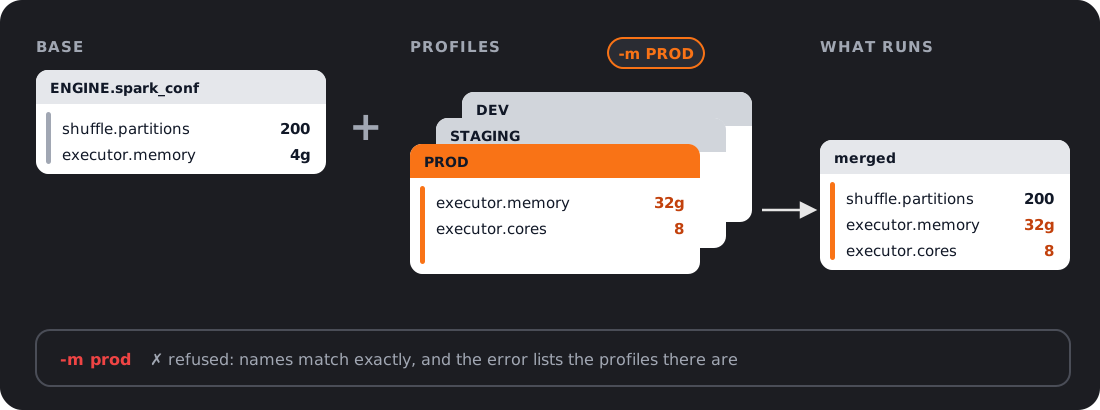
When -m <name> (--mode) is passed, the engine builds the Spark settings like this:
- Start with the base
ENGINE.spark_confdict. - Update with the named profile's
spark_conf(profile values win on conflict).
Profile-only keys are additive; base keys not overridden by the profile are kept.
A profile's catalog or schema_name, when set, replaces the base value.
Using profiles at runtime
run picks a profile with -m (--mode). validate takes -m or --profile
(the same thing). The name must match a key under profiles: exactly, including
its case: -m prod does not find a profile named PROD.
-m defaults to DEV (upper case). When a config defines profiles: and the
mode names none of them, the run stops with ConfigProfileError and lists the
valid names. Name your profiles DEV and PROD so the default finds one. A config
with no profiles: ignores the mode and uses the base spark_conf.
# Development: small cluster, few shuffle partitions (-m DEV is the default)
ubunye run -d pipelines -u fraud -p etl -t claims -m DEV

# Production: full cluster
ubunye run -d pipelines -u fraud -p etl -t claims -m PROD
validate checks the profile the same way run does, and also defaults to DEV.
So a config whose profiles are dev and prod fails validate before it can fail
a run:
Profile 'DEV' not found.

  Profile:   DEV
  Available: ['dev', 'prod']
  Hint: This config's profiles are: dev, prod. Names match exactly, case included; did you mean 'dev'? Pass -m dev. With no -m, run, validate, plan and doctor use DEV.
Validate with the profile you will run: ubunye validate ... -m PROD. plan and
doctor check it the same way.
Common Spark settings
These keys can be changed on any Spark session, so they work everywhere, Databricks included:
ENGINE:
  spark_conf:
    # Shuffle tuning
    spark.sql.shuffle.partitions: "200"
    spark.sql.adaptive.enabled: "true"
    spark.sql.adaptive.coalescePartitions.enabled: "true"

    # Delta
    spark.databricks.delta.optimizeWrite.enabled: "true"
    spark.databricks.delta.autoCompact.enabled: "true"
Memory and Hive keys are fixed when Spark starts; see the next section.
Note
All values must be strings: Spark's configuration API accepts only strings.
Use "true" not true, "200" not 200.
Spark keys fixed at session start
Some Spark keys are read once, when the Spark session starts, and can never be changed after. Examples:
spark.jars,spark.jars.packages(JDBC drivers, Delta jars)spark.sql.extensions,spark.sql.catalogImplementation,spark.sql.warehouse.dir(Delta, Hive)spark.driver.*,spark.executor.memory,spark.executor.memoryOverhead,spark.executor.cores(memory and cores)spark.master
Where such a key works depends on who starts the session:
| Who starts Spark | A fixed key in ENGINE.spark_conf |
|---|---|
Ubunye (ubunye run on the spark backend, no session running yet) |
applied |
The platform (Databricks, EMR, Dataproc, Glue, spark-submit, a notebook) |
refused with SparkSessionError, naming each key |
Where the platform starts Spark, set these keys there instead: the cluster
settings, a cluster policy, the job's conf, or spark-submit --conf / --jars.
The engine refuses them rather than ignoring them, so a task never believes it
enabled Delta or chose a cluster when it did not. A config may not set
spark.master when the platform already chose one; see
Deployment for that rule.
A setup where Ubunye starts Spark itself, with Hive:
ENGINE:
  spark_conf:
    spark.executor.memory: "8g"
    spark.driver.memory: "4g"
    spark.executor.memoryOverhead: "1g"
    spark.sql.catalogImplementation: "hive"
    spark.sql.warehouse.dir: "/user/hive/warehouse"
ENGINE is optional
If you omit ENGINE entirely the engine uses Spark defaults: