Pattern: Feature Store Pipeline
For anyone who trains and scores models on Spark and wants both to use the same features, computed once.
- The problem: the training job and the scoring job each compute "amount spent in the last 30 days" in their own way, and the numbers drift apart. Or training uses values from after the event it is learning about.
- When to use it: more than one model or job needs the same features, or you need training sets that only use what was known at the time.
- The one command:
ubunye run -d pipelines -u fraud -p features -t transaction -m PROD
A feature is one input column for a model, such as a customer's spend over 30 days. A feature store here is just a table of features (Delta, or Unity Catalog) that training and scoring both read.
Architecture
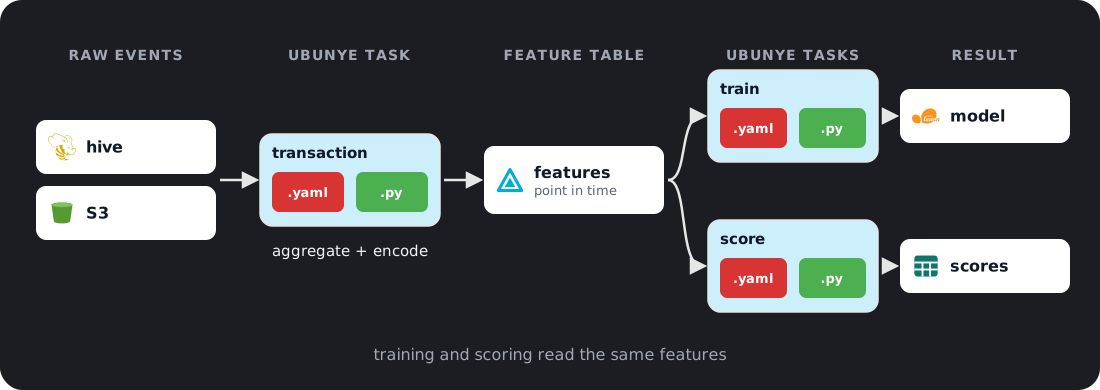
Three tasks in one pipeline, features:
pipelines/                         # the pipelines folder (-d)
└── fraud/                         # use case (-u)
    └── features/                  # pipeline (-p)
        ├── transaction/           # task: raw events -> feature table
        │   ├── config.yaml
        │   └── transformations.py
        ├── training_set/          # task: features as of each label's time
        │   ├── config.yaml
        │   └── transformations.py
        └── score_features/        # task: each customer's latest features
            ├── config.yaml
            └── transformations.py
Feature computation task
# pipelines/fraud/features/transaction/config.yaml
MODEL: etl
VERSION: "1.0.0"

ENGINE:
  profiles:
    DEV:
      spark_conf:
        spark.sql.shuffle.partitions: "4"
    PROD:
      spark_conf:
        spark.sql.shuffle.partitions: "400"

CONFIG:
  inputs:
    raw_transactions:
      format: hive
      db_name: raw
      tbl_name: transactions

    customer_profiles:
      format: hive
      db_name: raw
      tbl_name: customers

  outputs:
    transaction_features:
      format: delta
      path: s3://datalake/features/transaction/
      mode: overwrite
transformations.py:
from pyspark.sql import functions as F, Window
from ubunye.core.interfaces import Task

class FeatureTask(Task):
    def transform(self, sources: dict) -> dict:
        txn = sources["raw_transactions"]
        cust = sources["customer_profiles"]

        # Rolling 30-day aggregations
        w30 = (
            Window.partitionBy("customer_id")
                  .orderBy(F.col("event_ts").cast("long"))
                  .rangeBetween(-30 * 86400, 0)
        )

        features = (
            txn.withColumn("amount_sum_30d", F.sum("amount").over(w30))
               .withColumn("txn_count_30d",  F.count("*").over(w30))
               .withColumn("avg_amount_30d",  F.avg("amount").over(w30))
               .join(cust.select("customer_id", "risk_segment"), "customer_id", "left")
               .withColumn("risk_encoded",
                   F.when(F.col("risk_segment") == "HIGH", 2)
                    .when(F.col("risk_segment") == "MED",  1)
                    .otherwise(0))
               .select(
                   "customer_id", "event_ts",
                   "amount_sum_30d", "txn_count_30d", "avg_amount_30d",
                   "risk_encoded",
               )
        )

        return {"transaction_features": features}
Check it, then run it:
ubunye plan -d pipelines -u fraud -p features -t transaction
ubunye run  -d pipelines -u fraud -p features -t transaction           # DEV profile
ubunye run  -d pipelines -u fraud -p features -t transaction -m PROD   # PROD profile
-m picks the profile, and with it the Spark settings above (see
Engine). What success looks like:
Task fraud/features/transaction
  Inputs
    customer_profiles hive           raw.customers
                 not checked (not a local path)
    raw_transactions hive           raw.transactions
                 not checked (not a local path)
  Transform  FeatureTask  (transformations.py), written for pyspark
  Outputs
    transaction_features delta          s3://datalake/features/transaction/
                 mode overwrite

Plan OK: 1 task(s) can run.
Starting task: transaction (Mode: DEV, Deploy: client)
[OK] Run complete for transaction
The feature table has one row per transaction, with that moment's 30-day numbers:
customer_id            event_ts  amount_sum_30d  txn_count_30d  avg_amount_30d  risk_encoded
         c1 2026-10-03 11:51:20          427.41              1      427.410000             2
         c1 2026-10-03 18:15:18          576.43              2      288.215000             2
         c1 2026-10-06 22:00:18         1089.37              3      363.123333             2
Try it on your laptop
The output above came from a local Spark run with the two Hive inputs and the
Delta output swapped for Parquet files (format: s3, file_format: parquet,
a local path:). The transform did not change. event_ts must be a Spark
TIMESTAMP: a TIMESTAMP_NTZ column (what pandas writes for a time with no
time zone) cannot be cast to long for the 30-day window.
Point-in-time correct feature lookup
For training, join features to labels as of the label timestamp: each label gets the features as they were just before it, never values from later. This is what point-in-time correct means.
# pipelines/fraud/features/training_set/config.yaml
CONFIG:
  inputs:
    features:
      format: delta
      path: s3://datalake/features/transaction/

    labels:
      format: hive
      db_name: ml
      tbl_name: fraud_labels

  outputs:
    training_set:
      format: delta
      path: s3://datalake/ml/training_sets/fraud/
      mode: overwrite
transformations.py:
from pyspark.sql import functions as F
from ubunye.core.interfaces import Task

class TrainingSetTask(Task):
    def transform(self, sources: dict) -> dict:
        features = sources["features"]
        labels   = sources["labels"]

        # Asof join: latest feature snapshot before the label timestamp
        # (the feature table's timestamp column is event_ts)
        training_set = (
            labels.join(features, "customer_id")
                  .filter(F.col("event_ts") <= F.col("label_ts"))
                  .groupBy("customer_id", "label_ts", "is_fraud")
                  .agg(F.max("event_ts").alias("event_ts"))
                  .join(features, ["customer_id", "event_ts"])
        )
        return {"training_set": training_set}
Run it after transaction:
What success looks like: one row per label, with the features from the latest
transaction before label_ts:
customer_id            event_ts   label_ts  is_fraud  amount_sum_30d  txn_count_30d  avg_amount_30d  risk_encoded
         c1 2026-11-04 10:49:55 2026-11-05         1         8584.19             21      408.770952             2
         c2 2026-11-04 22:24:43 2026-11-06         0         5231.07             13      402.390000             1
         c3 2026-11-03 14:24:42 2026-11-07         0         9248.64             18      513.813333             0
Serving latest features for scoring
# pipelines/fraud/features/score_features/config.yaml
CONFIG:
  inputs:
    features:
      format: delta
      path: s3://datalake/features/transaction/

  outputs:
    latest_features:
      format: delta
      table: main.fraud.latest_features
      mode: overwrite
transformations.py:
from pyspark.sql import functions as F
from ubunye.core.interfaces import Task

class LatestFeaturesTask(Task):
    def transform(self, sources: dict) -> dict:
        df = sources["features"]
        values = [c for c in df.columns if c != "customer_id"]
        latest = df.groupBy("customer_id").agg(
            F.max_by(F.struct(*values), "event_ts").alias("latest")
        ).select("customer_id", "latest.*")
        return {"latest_features": latest}
values leaves out customer_id: it is already the group key, and selecting it
twice fails with COLUMN_ALREADY_EXISTS.
What success looks like: one row per customer:
customer_id            event_ts  amount_sum_30d  txn_count_30d  avg_amount_30d  risk_encoded
         c1 2026-11-05 01:28:32         9059.56             22      411.798182             2
         c2 2026-11-09 05:42:13         6207.21             14      443.372143             1
         c3 2026-11-03 14:24:42         9248.64             18      513.813333             0
Schedule with Airflow
Add an ORCHESTRATION block to the task's config.yaml and export a DAG. Every
key and flag is on Orchestration.