Concepts
The words these docs use, each in one or two plain sentences, with a link to the page that explains it in full. Read it once before your first task, or come back when a word is new.
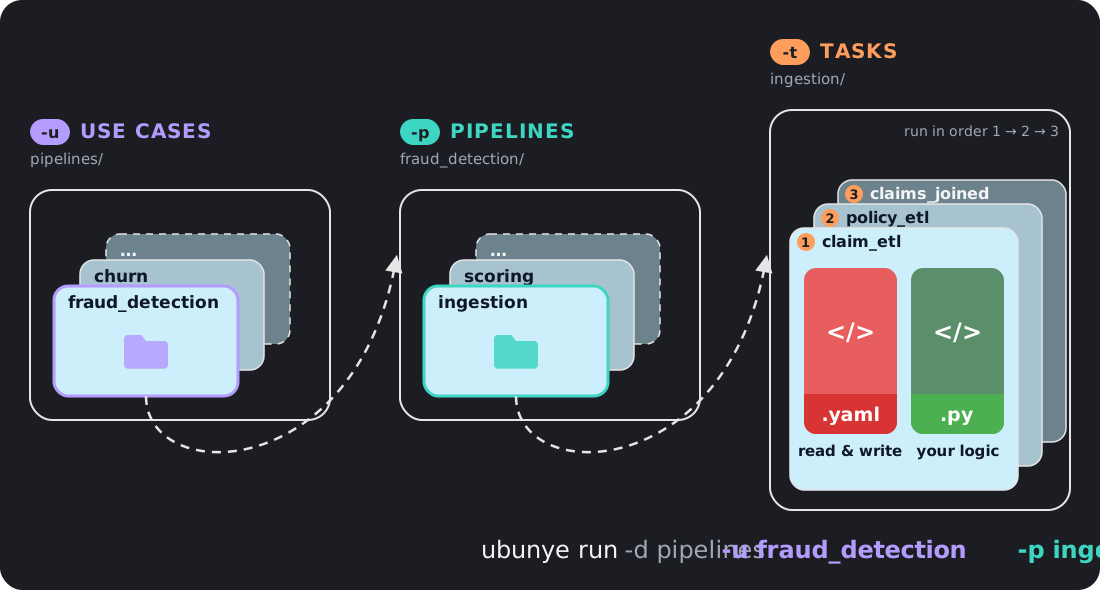
Folders and names
| Word | What it means | More |
|---|---|---|
| pipelines folder | The top folder that holds all your use cases. You name it with -d (--usecase-dir), for example -d pipelines. |
Project Structure |
| use case | A folder for one business problem, such as fraud_detection. It holds pipelines. Named with -u. |
Project Structure |
| pipeline | A folder inside a use case that holds tasks which run in order, such as ingestion. Named with -p (--pipeline). |
Project Structure |
| task | One runnable unit of work: read some data, change it, write it. Named with -t. |
Project Structure |
| task folder | The folder that is a task. It holds config.yaml (what to read and write) and transformations.py (your code). In config templates it is {{ task_dir }}. |
Project Structure |
So ubunye run -d pipelines -u fraud_detection -p ingestion -t claim_etl runs the task
folder pipelines/fraud_detection/ingestion/claim_etl/.
Older name: package
Before 0.9 the middle level was called a package (--package). The CLI flag still
works until 1.0, with a warning. Run records still name this field package, so
when you read a record, package is the pipeline. See Upgrading.
Running a task
| Word | What it means | More |
|---|---|---|
| profile | A named set of engine settings under ENGINE.profiles in config.yaml, such as DEV or PROD. You pick one with -m/--mode; run uses DEV if you say nothing. Names must match exactly, case included. |
Engine and Profiles |
| backend | What actually moves the data: spark (needs Java), databricks (the session a notebook already has) or pandas (no Java, one machine). Pick one with --backend. |
Execution Backends |
| connector | The small plugin that reads from or writes to one kind of place. The format: key picks it, for example format: s3 for files on any path, local or cloud, or format: jdbc for a database. |
Connectors |
| write mode | The mode: key on an output: what happens to data already there. overwrite, append, merge or overwrite_partitions. |
Inputs and Outputs |
| expectations | Checks on the data a task reads and writes, such as "no null ids". A failed check can stop the run, warn, or move bad rows to a quarantine output. Checks run before anything is written. | Expectations |
After a run
| Word | What it means | More |
|---|---|---|
| run record | A file a run leaves behind when you pass --lineage: when it ran, how it went, row counts, and a hash of the config, the code and every row read and written. ubunye lineage list and ubunye lineage compare read it. |
Run Records |
| batch | A task with its -dt and --var values. Ubunye refuses to append the same batch twice unless you pass --rerun. |
Safe Reruns |